Free · No sign-up · No watermark
YouTube Thumbnail Downloader
Paste any YouTube link and SnapSave shows every thumbnail size YouTube stores for that video — up to HD 1280×720. Preview each one, then download the original image as JPG, PNG or WEBP, or copy its direct URL. Free, no sign-up, works on any device.
Works with youtube.com/watch, youtu.be, Shorts, embed and live links, or a plain 11-character video ID.
- Original HD quality
- JPG, PNG & WEBP
- Bulk up to 20 videos
- Works on any device
Need a Shorts thumbnail? Use the YouTube Shorts thumbnail downloader.
How to Download a YouTube Thumbnail — 3 Steps
-
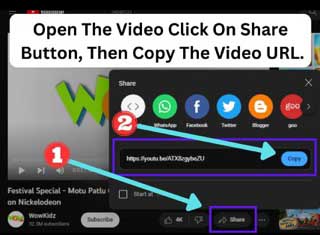 Step 1
Copy the video link
Open the video on YouTube, tap Share and choose Copy link. On a desktop you can also copy the URL from the browser address bar.
-
 Step 2
Paste and press Get Thumbnails
Paste the link into the box above and press Get Thumbnails. SnapSave checks every size YouTube stores and shows only those that actually exist for your video.
-
 Step 3
Choose a format and download
Select JPG, PNG or WEBP, then click Download under the size you want. HD 1280×720 gives the sharpest result. Use Copy link if you only need the image URL.
YouTube Thumbnail Sizes Explained
Quick answer: YouTube stores up to five thumbnail sizes per video. The largest is HD 1280×720 (maxresdefault.jpg), but it only exists when the uploader provided a large custom thumbnail or the video was shot in HD.
SnapSave checks every size automatically and only shows the ones that exist for your video — no blank placeholders, no broken images.
| Size name | Filename | Resolution | Availability |
|---|---|---|---|
| HD | maxresdefault.jpg | 1280×720 | HD videos with a custom thumbnail |
| SD | sddefault.jpg | 640×480 | Most videos |
| High | hqdefault.jpg | 480×360 | Every video |
| Medium | mqdefault.jpg | 320×180 | Every video |
| Small | default.jpg | 120×90 | Every video |
The SD and High sizes use a 4:3 frame, so a widescreen thumbnail appears with black bars at top and bottom. For a clean 16:9 image with no bars, choose HD or Medium.
Can You Download a YouTube Thumbnail in 4K?
Short answer: No. YouTube does not store 4K thumbnails. The maximum size is HD 1280×720, even for videos filmed in 4K, 8K or HDR.
Sites and tools that advertise "4K YouTube thumbnails" are simply upscaling the 1280×720 HD image — the file is bigger, but no new detail is added. SnapSave gives you the original, unmodified file exactly as YouTube serves it.
If you need a larger or differently sized image for a design project, use our thumbnail resizer after downloading the HD original.
Why Use SnapSave
Everything you need to grab, convert and reuse a YouTube thumbnail — in one free tool, no account needed.
Original HD quality
Get the exact file YouTube stores — no upscaling, no re-compression, no watermark added.
All five sizes, clearly labelled
Every size is checked automatically. Sizes that don't exist for a video are listed as unavailable so you know exactly what you're getting.
JPG, PNG or WEBP
Keep the original JPG, or convert to PNG or WEBP directly in your browser before downloading — no extra software needed.
Copy the image URL
One click copies the direct thumbnail URL for embedding in documents, spreadsheets, emails or code.
Bulk mode — up to 20 at once
Paste up to 20 YouTube links, one per line, and download the best thumbnail of each video in a single step.
Works on any device — free
Runs in any modern browser on Android, iPhone, tablet or desktop. No app to install, no account needed, completely free.
Who Uses a YouTube Thumbnail Downloader?
- YouTube creators who study the thumbnails of top-ranking videos in their niche before designing their own.
- Graphic designers who need a reference image or placeholder for a client presentation or mockup.
- Teachers and students who embed a video's cover image in slides, worksheets or study notes.
- Marketers who build reports, playlists or campaign summaries with visual video previews.
- Researchers and archivists who keep a visual record of how a video was presented at a given time.
Using Thumbnails Responsibly
Every YouTube thumbnail belongs to the creator who uploaded the video. Saving one for personal reference, research, commentary or education is generally considered fair use. Before using a thumbnail commercially or publicly, ask the creator for permission. Never re-upload someone else's thumbnail as your own original work.
SnapSave does not host or store any images. It requests the public thumbnail URLs that YouTube already makes available to any browser, and it is not affiliated with YouTube or Google.
Frequently Asked Questions
Is SnapSave free to use?
Yes. SnapSave is completely free. There is no sign-up, no download limit and no watermark on the images you save.
What is the highest YouTube thumbnail quality I can download?
The largest thumbnail YouTube stores is HD 1280×720 (the file is called maxresdefault.jpg). SnapSave shows it whenever it exists for a video, together with every smaller size.
Can I download a YouTube thumbnail in 4K?
No tool can download a true 4K YouTube thumbnail because YouTube does not store one. Even videos shot in 4K only have a 1280×720 thumbnail. Sites that advertise 4K thumbnails are simply upscaling the HD image — more pixels, but no added detail. SnapSave gives you the original, unmodified file.
Why is the HD 1280×720 size missing for some videos?
YouTube only creates the HD 1280×720 version when the uploader adds a large custom thumbnail or the video itself was uploaded in HD. Older videos and low-resolution uploads often stop at 640×480 or 480×360.
Does SnapSave work for YouTube Shorts and live streams?
Yes. Paste a Shorts URL, a live stream link, an embed URL or a youtu.be short link and SnapSave reads the video ID automatically — no adjustments needed.
Can I download thumbnails for multiple videos at once?
Yes. Switch to Bulk mode, paste up to 20 YouTube links — one per line — and download the best available thumbnail for each in one step.
Can I use downloaded thumbnails for my own content?
A thumbnail belongs to the original video creator. Using it for personal reference, research, education or commentary is fine. For commercial use, get the creator's permission first. Never re-upload someone else's thumbnail as your own work.
Do I need to install an app or browser extension?
No. SnapSave runs entirely in your web browser — on Android, iPhone, tablets and computers. No download, no account and no browser extension are required.
Can I get thumbnails from private YouTube videos?
No. SnapSave only works with videos whose thumbnails YouTube makes publicly available, such as public and unlisted videos. Private video thumbnails are not publicly accessible.